Authentication
Create an API key in the Exhibitor Center, then send it with every request to the Leads API.
When to use an exhibitor API key
Use an exhibitor API key when you want to:
- Interact with your exhibition booth through the API.
- Run a script that exports data from your exhibition booth on Swapcard.
- Automate actions in your own CRM, such as importing the leads your team collected.
Organizing the event rather than exhibiting at it? Use an organizer API key instead.
Create an API key
- Open the Exhibitor Center and select your exhibition booth.
- Go to Leads > API keys.
- Select Create key.
- Copy the key and store it somewhere safe, such as a secrets manager or an environment variable.
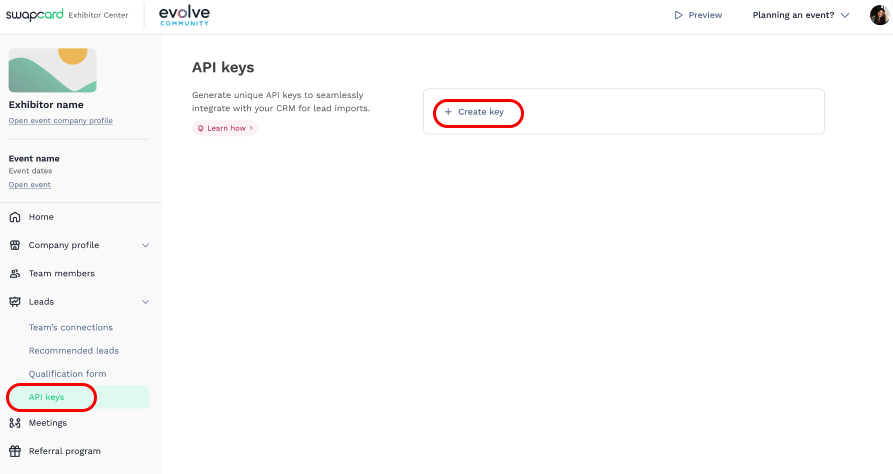
Some pages and tools call the API key an access token. Both names refer to the same thing.
Send the API key with your requests
Every request needs a valid API key. Send the key as-is in the Authorization header, with no Bearer prefix.
The examples below send a minimal query to the Leads API endpoint, https://developer.swapcard.com/exhibitor/graphql. If the key is valid, the response contains a data object.
- cURL
- Node.js
- PHP
curl https://developer.swapcard.com/exhibitor/graphql \
  -H 'Authorization: <API_KEY>' \
  -H 'Content-Type: application/json' \
  -d '{"query":"{ __typename }"}'
const response = await fetch("https://developer.swapcard.com/exhibitor/graphql", {
  method: "POST",
  headers: {
    Authorization: process.env.SWAPCARD_API_KEY,
    "Content-Type": "application/json",
  },
  body: JSON.stringify({
    query: "{ __typename }",
  }),
});

console.log(await response.json());
<?php
$apiKey = getenv('SWAPCARD_API_KEY');

$ch = curl_init('https://developer.swapcard.com/exhibitor/graphql');
curl_setopt_array($ch, [
    CURLOPT_POST           => true,
    CURLOPT_RETURNTRANSFER => true,
    CURLOPT_HTTPHEADER     => [
        'Authorization: ' . $apiKey,
        'Content-Type: application/json',
    ],
    CURLOPT_POSTFIELDS     => json_encode(['query' => '{ __typename }']),
]);

$response = curl_exec($ch);
if ($response === false) {
    echo 'Request failed: ' . curl_error($ch) . PHP_EOL;
} else {
    echo $response . PHP_EOL;
}
curl_close($ch);
Next, see the Leads API integration examples.
Keep your API key secure
Your API key gives access to your private Swapcard data. Treat it like a password.
warning
- Keep the key on your server. Never embed it in a web page, a mobile app or any other client-side code.
- Only request the data your integration needs.