Authentication
When to use an organizer API key
Use an organizer API key when you want to:
- Read or update the data of your own organization through the API.
- Run a script that imports data into, or exports data from, your organization.
- Automate specific actions in your own organization.
Building an integration for an exhibitor instead? Exhibitors use their own key from the Exhibitor Center. See Leads API authentication.
Create an API key
- In Swapcard Studio, go to API keys.
- Select Create a new key.
- Copy the key and store it somewhere safe, such as a secrets manager or an environment variable.
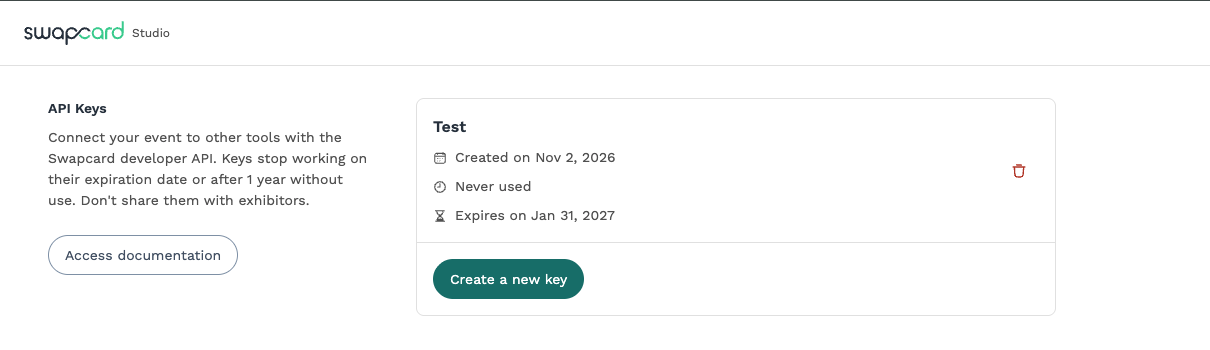
A key stops working on its expiration date, or after one year without use. When that happens, create a new one.
Some pages and tools call the API key an access token. Both names refer to the same thing.
Send the API key with your requests
Every request needs a valid API key. Send the key as-is in the Authorization header, with no Bearer prefix.
The key acts on behalf of the user who created it, so it has that user's roles and rights. Make sure that user has the roles your integration needs, and no more.
The examples below send a minimal query to the Content API endpoint, https://developer.swapcard.com/event-admin/graphql. If the key is valid, the response contains a data object.
- cURL
- Node.js
- PHP
curl https://developer.swapcard.com/event-admin/graphql \
  -H 'Authorization: <API_KEY>' \
  -H 'Content-Type: application/json' \
  -d '{"query":"{ __typename }"}'
const response = await fetch("https://developer.swapcard.com/event-admin/graphql", {
  method: "POST",
  headers: {
    Authorization: process.env.SWAPCARD_API_KEY,
    "Content-Type": "application/json",
  },
  body: JSON.stringify({
    query: "{ __typename }",
  }),
});

console.log(await response.json());
<?php
$apiKey = getenv('SWAPCARD_API_KEY');

$ch = curl_init('https://developer.swapcard.com/event-admin/graphql');
curl_setopt_array($ch, [
    CURLOPT_POST           => true,
    CURLOPT_RETURNTRANSFER => true,
    CURLOPT_HTTPHEADER     => [
        'Authorization: ' . $apiKey,
        'Content-Type: application/json',
    ],
    CURLOPT_POSTFIELDS     => json_encode(['query' => '{ __typename }']),
]);

$response = curl_exec($ch);
if ($response === false) {
    echo 'Request failed: ' . curl_error($ch) . PHP_EOL;
} else {
    echo $response . PHP_EOL;
}
curl_close($ch);
The Analytics API uses the same key and the same Authorization header.
Keep your API key secure
Your API key gives access to your organization's private Swapcard data. Treat it like a password.
- Keep the key on your server. Never embed it in a web page, a mobile app or any other client-side code.
- Don't share an organizer key with exhibitors. Exhibitors create their own key in the Exhibitor Center.
- Only request the data your integration needs.